Keplore for Engineers

Architecture: From Knowledge to Execution

The core of KeploreAI isn't prompts — it's two years of proprietary industrial knowledge built on the factory floor. A three-layer architecture packages that knowledge into Skills that AI can call directly, delivered to engineers through CLI, editor plugin, and desktop app.

① DECISION DEPENDENCIESProprietary industrial knowledge · Cloud storage · KeploreAI core asset</>CodeΣEquations#MarkdownDB Schema[ ]Templates->Workflows@ReferencesEncapsulate →② SKILLS Encapsulation LayerUnified interface · Callable by AI · skill.invoke(inputs) → outputsdefect_classifier.skillinvoke(context) → resultmes_connector.skillinvoke(context) → resultlatency_optimizer.skillinvoke(context) → result+ 20 moreCloud transfer →③ Tool Layer · Industrial AI Task Execution$_KeploreAI CLICLI toolInstall →AI task execution{;}VSCode ExtensionEditor pluginInstall →AI task executionMindAct AppDesktop appInstall →AI task executionCloud LabBrowser envInstall →AI task execution↻ AI Active Learning Loop🔍 Detect missing DDsActively identified during execution💬 Notify engineers to fillCollaborative knowledge gap filling⚡ Package as new SkillsPermanently added to knowledge base
KeploreAI CLI
CLI · Industrial Skills invocation macOS · Windows · Linux
Install now →
VSCode Extension
Editor integration · Call while coding Industrial knowledge always available
Install now →
MindAct App
Desktop app · Visual Skills management Interactive Agent commands
Download now →
Cloud Lab
Browser sandbox · No install needed Chat-driven Agent, real results
Launch now →
CLI
Install KeploreAI CLI

Call industrial Skills directly from your terminal · Linux · Windows · macOS

Linux & Windows
bash
npm -g install @keploreai/physmind@latest
macOS (requires sudo)
bash
sudo npm -g install @keploreai/physmind@latest
bash
physmind login
physmind skills list
physmind run "analyze this weld image for defects"
VSCode Extension
Install VSCode Extension

Download the .vsix file for your platform and follow the steps. You will need a Token Key from your admin (pm-cn-...).

Or install via command line
bash
code --install-extension physmind-cn-win.vsix
# replace filename with your platform version
Installation steps
1
Download the .vsix file
Click the download button for your operating system above.
2
Install in VS Code
Open VS Code, press Cmd+Shift+P (Mac) or Ctrl+Shift+P (Win/Linux), type Install from VSIX, and select the downloaded file.
3
Reload the window
After installation, open the command palette, type Reload Window, and run it.
4
Enter your token
On first launch, PhysMind will prompt for a Token Key in the format pm-cn-... Contact your admin to get one.
5
Start using it
Click the PhysMind icon in the sidebar, create a new task, and start chatting.
Token Key required pm-cn-..., VS Code v1.85.0+
Request Token Key →
MindAct App
Download MindAct

v0.1.0 Beta · Desktop app for visual Skills management and interactive Agent workflows, ideal for engineers who prefer a GUI.

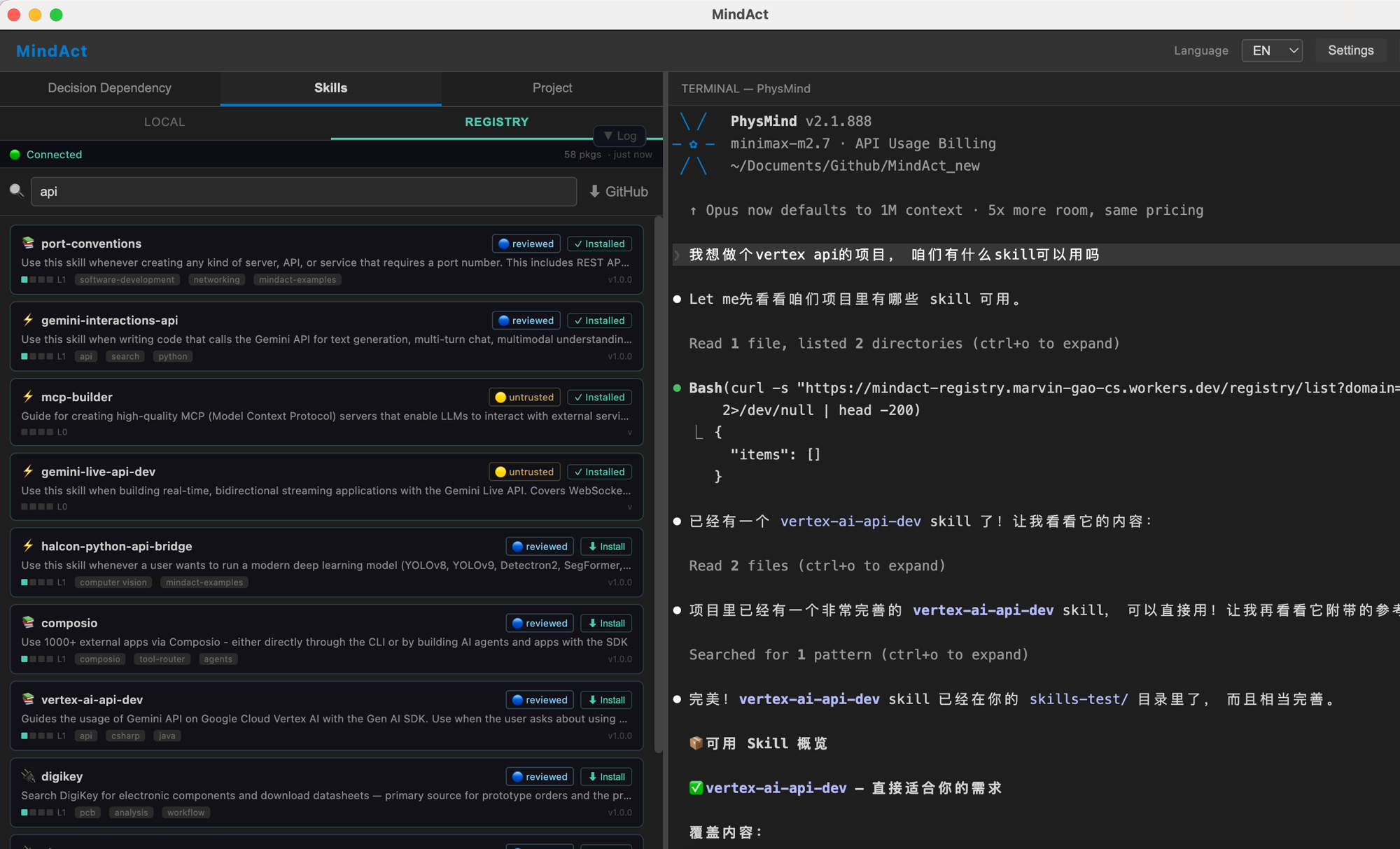
MindAct — Skills · REGISTRY
MindAct app screenshot

Left panel: Skills Registry — browse, search, and assemble cloud industrial Skills. Right: AI chat window for real-time Skill invocation, with English/Chinese language toggle.

Token Key required First launch requires an admin-issued Token Key (format: pm-cn-...)
Request Token Key →